
Sign up
Step-by-step guide
Five phases, twenty steps.
Follow the steps in order. The steps marked in gold are required to activate Amplify 24X.
Before you start
Have these four things ready.
ID documentID card or passport – for the KYC verification (step 7).
PhoneKYC is easiest to complete on your phone.
Access to your e-mailYou will need to confirm two e-mails – from Stratify and from Tag Markets.
Funds for the depositAt least 10 $ (100 $ for commissions in the partner programme). Crypto is the cheapest; cards carry a 6 % fee, bank transfers above 500 $.
Your path in five phases
- 01Sign-up and linking the accountsSteps 1–5
- 02First login and verificationSteps 6–8
- 03DepositStep 9
- 04Activating the SONIC strategySteps 10–18
- 05Following your profitsSteps 19–20
Don’t skip steps – do them in order. For phases with the Video button you can also watch each procedure in a short video.
01
Sign-up and linking the accounts
- 1First you sign up on Stratify and confirm the e-mail you receive.Sign up on Stratify
- 2You log in to Stratify and click Register to CopyX.
- 3You enter a password (we recommend using the same one) and link both accounts – Stratify and Tag Markets.
- 4You confirm the e-mail you received from Tag Markets.
- 5You log in to Tag Markets through Stratify (Login).
02
First login and verification
- 6The first time you enter Tag Markets, you fill in a short questionnaire.
- 7ImportantClicking the link starts the KYC process (identity check). Just follow the instructions and complete it on your phone – avoid doing it through the Sumsub process.You can only make a deposit once your KYC is approved!
- 8On your Tag Markets profile you also accept the terms.
03
Deposit
- 9At the top of the page you click Deposit. You can deposit with crypto, a card or a bank transfer (above 500 $).
04
Activating the SONIC strategy
- 10Next you activate the SONIC account in the Copy X strategy.
- 11You open Copy X, choose the SONIC strategy and click Details, then Connect.
- 12A form opens where you enter the amount in whole numbers – at least 10 $.If you refer others and want to qualify for commissions on Stratify, the minimum amount is 100 $.
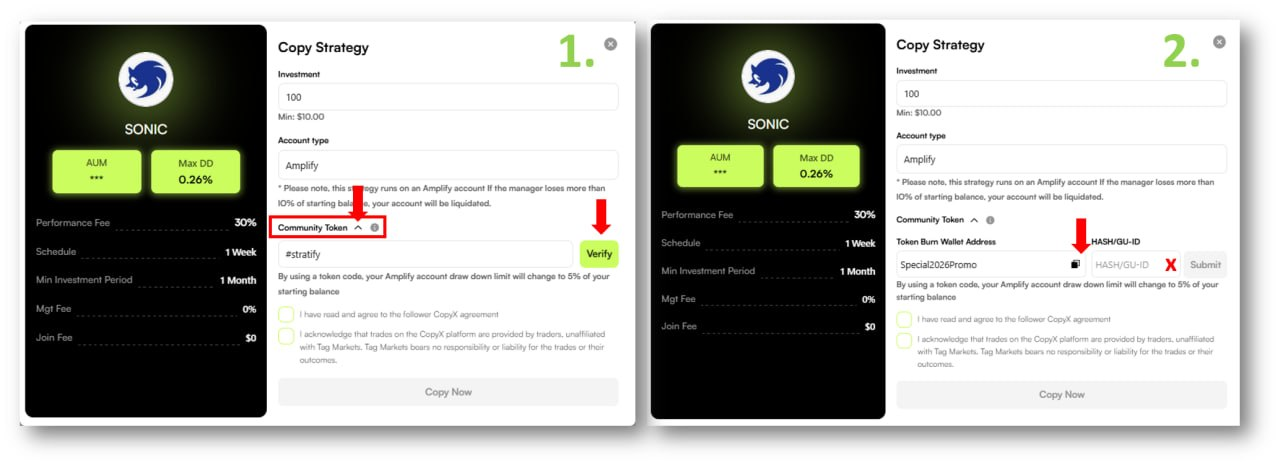
- 13ImportantREQUIRED! You open Community Token so that the field for the 24X promo codes appears (while the promotion is still available).
- 14First you enter and confirm with the Verify button.
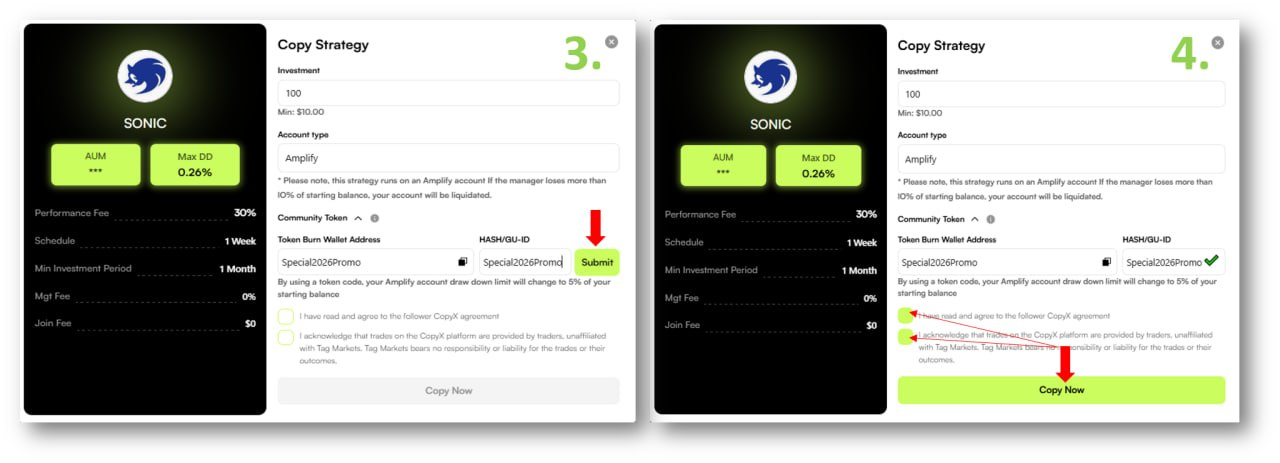
- 15Then you enter the promo code in both fields – Token Burn Wallet Address and HASH/GU-ID – and confirm with the Submit button.
Important – this is what the activation looks like
- 16Below, you tick both boxes to accept the terms.
- 17You click Copy Now and wait for the SONIC account to be created. If it doesn’t work the first time because of heavy traffic, be patient and try again.
- 18Very importantYou follow everything in Copy X Follower Hub → Strategies, where you make reinvestments, new deposits and profit withdrawals.You do all of this on your existing SONIC account – do not create a new one.
05
Following your profits
- 19To follow your profits on your phone, you install the MetaTrader 5 app.
- 20You connect the Tag Markets platform to MT5. Accept the app’s terms – make sure you don’t open a demo account. Click + for a new account, search for our broker TM Financials and select it. The login page opens: under Login you enter your MT5 account number (you’ll find it on the Tag Markets platform in Follower Hub → Dashboard) and your password (Master password). Then you just confirm the MT5 connection with Tag Markets. In MT5 you follow profits and statements – daily, weekly, monthly …

Your start
One click to your account.
Sign up on Stratify through my referral link – this is step 1 above.
Sign up on StratifyThe official Stratify sign-up page opens in a new tab
Trading is risky. Past results do not guarantee future returns.
Questions?
Still missing some information?
Contact me for more details.

Crypto debit VISA card
I also want the card
See what the BIX Pay VISA card from the Tag Markets ecosystem offers.
I also want the card